
Kilby: What Capital Markets Tools Do You Use?

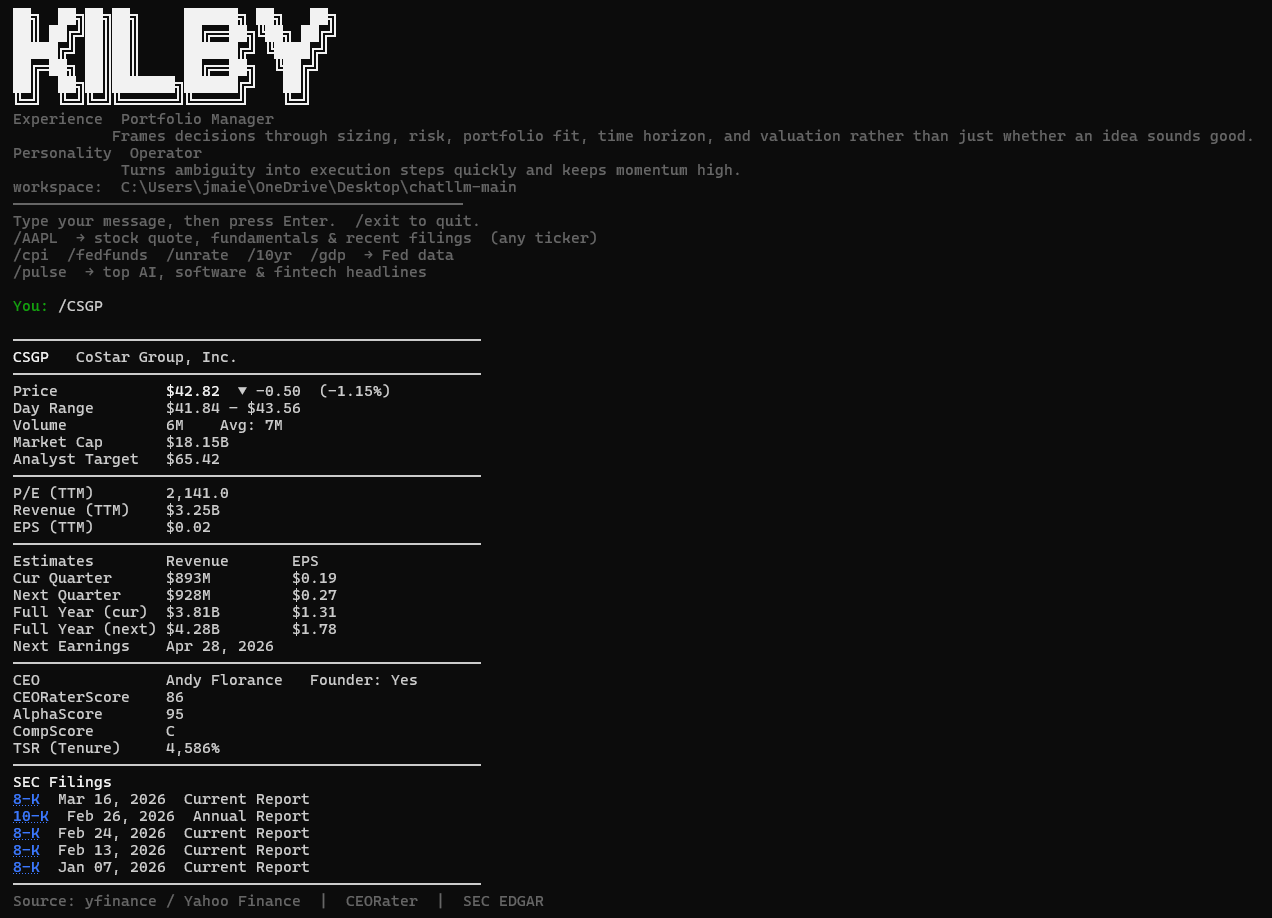
The pic above is our Kilby AI agent in terminal view with the “Portfolio Manager” lens applied.
Kilby leverages data, tools and content from various TEK2day properties including Pulse, CEORater, and EDGAR Watcher, as well as 3rd party tools such as Yahoo Finance and FRED. Kilby analyzes the data we expose it to - regardless of source - using the latest Anthropic models (Claude Opus 4.6 and Sonnet 4.6). There is not a smarter agent on the market.
Kilby terminal command menu:
/AAPL → stock quote, fundamentals, recent filings (any ticker)
/cpi /fedfunds /unrate /10yr /gdp → Fed data
/pulse → top AI, Software & Fintech Headlines
What tools do you use? If you have a favorite Capital Markets/Investor tool - let us know and we may include it here in Portfolio Manager view: info@tek2day.com. If you have other tools that you use personally outside of any Capital Markets application (health data, various 3rd party data sets), tell us and we will build the integration if the use case is broad enough and if it fits Kilby’s general product road map.
Experience lenses: The other “Experience lenses” that we have built and will continue to scale include: CEO (Tech Industry), Chief Financial Officer, COO (Tech Industry), Entrepreneur (Tech Industry), Equity Research Analyst, Investment Banker, M&A Strategy Exec, Portfolio Manager, Private Equity Executive, Sales & Marketing Exec, Senior Software Engineer and Venture Capitalist.
Open Source: All of the above tools are free other than the fact you need to bring your own Anthropic API Key to access Kilby.
Local Agent: Run the Kilby binary on your machine to give Kilby full access to local files, folders, spreadsheets, PDFs, and Python execution — no upload required.
Create a Kilby account at agentkilby.com and add your Anthropic API key in Settings.
Install Kilby on your machine:
Mac & Linux: curl -fsSL https://agentkilby.com/install.sh | bash
Windows (PowerShell): powershell -ExecutionPolicy Bypass -Command “irm https://agentkilby.com/install.ps1 | iex”
Open a terminal, cd into any folder, and run kilby. Your browser opens once to approve — after that it's just kilby.